In short: Mercurio is the official platform to submit immigration authorisation applications (initial and renewals) online, using a digital certificate or DNIe; at the end you get a resguardo (receipt), which is the valid proof of submission.
In person or by representative? Filing is fully online: you do it with a certificate/DNIe, or through a representative (gestor administrativo, graduado social, lawyer). Note: after approval, the TIE and fingerprints are done in person, with a cita previa for fingerprints; that appointment is not booked through Mercurio.
The channel is the electronic headquarters: sede.administracionespublicas.gob.es → Mercurio. To log in you need a recognised digital certificate installed in your browser or a DNIe; Cl@ve is not listed as a way in. You can file yourself or through a representative: gestores administrativos, graduados sociales and lawyers use their professional access if they are registered with their General Council. You need the AutoFirma program to sign. To obtain the certificate, see Cl@ve and electronic certificate. Each form (EX-xx) is chosen inside the app; the official forms are here. Important: Mercurio covers the filing; if your initial authorisation is not implemented in Mercurio, it is filed via the Electronic Register or in person. After approval, the TIE and fingerprints are done in person.
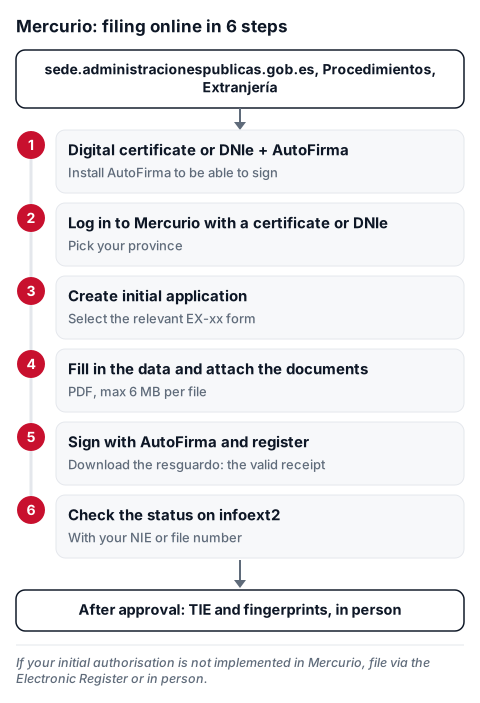
Steps:
- Get a digital certificate or DNIe and install AutoFirma.
- Go to Mercurio (sede → Procedimientos → Extranjería), log in with your digital certificate or DNIe and pick your province.
- "Create initial application" and select the relevant form (EX-xx).
- Fill in the data and attach the documents (PDF, max 6 MB per file).
- Sign with AutoFirma and register → "Download resguardo" (valid receipt).
- Check the status at infoext2 with your NIE or file number.
Adding documents. Mercurio is also used to add documents to immigration files that are already open, besides submitting new applications and renewals.
How to fill in the most used forms, field by field: EX-00 (studies), EX-01 (non-lucrative), EX-11 (long-term residence), EX-17 (TIE), EX-19 (EU citizen family member). Full list: EX immigration forms.
Official source: Mercurio — Telematic immigration authorisation applications. Informational only; check the official source and a professional for your specific case.