
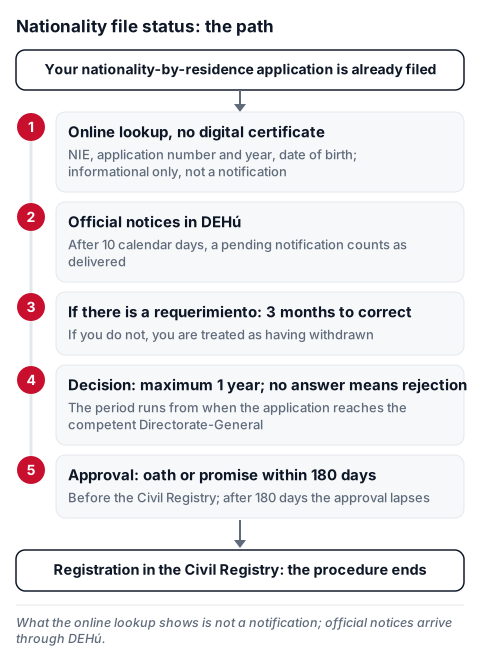
In short: to see your Spanish citizenship application status (by residence), use «¿Cómo va lo mío?», the online lookup on the Ministry of Justice electronic office. You do not need a digital certificate: it asks for your NIE, the number and year of your application and your date of birth. What it shows is informational and does not count as a notification; official notices (document request, decision) arrive through DEHú. For the status of a residence or work file there is a different lookup: check immigration application status Spain.
In person or by representative? The lookup is online and needs no digital certificate. Notifications go to the person you named when you filed: you, your legal representative or your voluntary representative (Ministry leaflet on DEHú). The oath or promise, once nationality is granted, is made before the head of the Civil Registry (art. 12.1 of RD 1004/2015) or a notary (art. 68.3 of Law 20/2011). Requirements and the rest of the procedure are in Spanish nationality by residence.
Steps
- Have your NIE, the number and year of your application and your date of birth at hand.
- Open the online lookup of nationality-by-residence files. On the procedure page it appears as «Tramitación On-line sin Certificado Digital».
- Fill in NIE, Número (your application number, in the format of the red example on the form: an R and digits, like R500001), Año (year) and Fecha de nacimiento (date of birth).
- Tick «No soy un robot», press «Verificar» and then «Enviar».
- Read the status shown below. If a notification is pending, open it in DEHú (see below).
What the service shows. Your file number and the stage it is at, as the office describes it. In the Ministry's guide the example is «Abierto - Registrado», with the notice «Su expediente ha sido registrado correctamente» and a note that steps after approval are done at the Civil Registry. If the approval has already been notified, you can open the electronic original of the document. Neither the procedure pages nor the guide publish the full list of statuses or what each means, so do not interpret a status on your own: ask the Ministry through the office's contact channels or a professional. The office itself states that this information is not a notification.
Notifications through DEHú. The procedure is electronic and all communications go that way (Law 19/2015, seventh final provision, paragraph 2). When there is a notification, go to DEHú, press «Acceder» and pick an identification method (electronic certificate, Cl@ve PIN, permanent Cl@ve or another shown on screen). You have 10 calendar days from when it is made available; after that it counts as delivered even if you never opened it (Ministry leaflet). If DEHú gives an error on login, the leaflet recommends another browser; for problems with the notification, call 060 or use the Buzón de ayuda (help mailbox).
Deadlines
- Decision: maximum 1 year from when the application reaches the competent Directorate-General of the Ministry of Justice. With no express decision in that period, the application is deemed rejected by silence (art. 11.3 of RD 1004/2015). Silence is not an approval.
- Document request (requerimiento): 3 months from being notified to correct or provide what is missing; if you do not, you are treated as having withdrawn (art. 10).
- Notification in DEHú: 10 calendar days to open it.
- After approval: 180 days, counted from the day after notification, to make the oath or promise; if they pass without it, the approval lapses (art. 21.4 of the Civil Code; art. 12.1 of the RD); an appointment obtained within the deadline is valid (Ministry FAQ, no. 12).
- Registration: the head of the Civil Registry makes it within 5 days of the oath or promise, which ends the procedure (art. 13.1).
If you get a document request (requerimiento). It is the notice that the application or documents are not enough (art. 10.1). The notification is the document that says what is missing: read all of it in DEHú and answer within the 3 months. The online status lookup is not an answer and does not replace it.
If the year passes with no answer. The application is deemed rejected by silence (art. 11.3). Appeals are possible against a presumed rejection; the deadline and route depend on your case, so talk to a professional.
When nationality is granted. The decision is notified preferably through the electronic office or another electronic means (art. 11.4). Then you have 180 days, counted from the day after notification, to make the oath or promise before the head of the Civil Registry (or a notary, art. 68.3 of Law 20/2011 on the Civil Registry) and, where applicable, declare that you renounce your previous nationality (art. 12.1 of RD 1004/2015 and art. 23 of the Civil Code). If they pass without it, the approval lapses (art. 21.4 of the Civil Code), so book your appointment early. According to the Ministry of Justice FAQ (no. 12), getting the appointment within the 180 days is enough even if the date you are given is later. Details, renunciation and DNI: Spanish nationality by residence. How to book the oath appointment: the nationality oath.
Where
- Status lookup: Ministry of Justice electronic office.
- Questions about your file: office contact page (phone, forms and in-person service by appointment).
- Technical problems with notifications: DEHú or phone 060.
Official source: Nationality by residence — Ministry of Justice electronic office · Royal Decree 1004/2015.
Informational only; check the official source and a professional for your specific case.
